


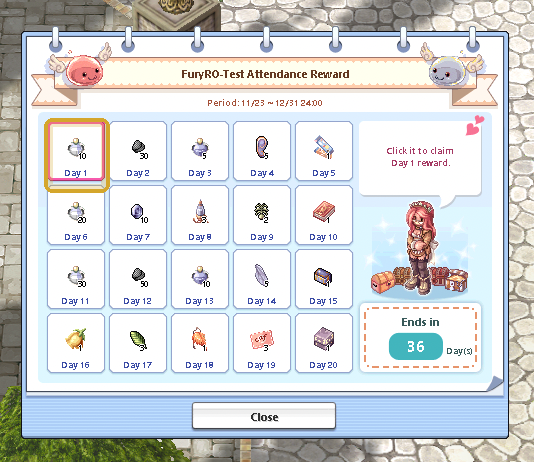
Log in to the game once a day and claim a free reward. Claim on 20 different days during the event to collect all 20.
Coming soon
Launch & Holiday Rewards
25 November 2026 to 31 December 2026
How it works
- One reward a day, per account. Claiming on one character counts for the whole account.
- Missed a day? No problem. Nothing resets: your next claim simply gives the next reward.
- A new day starts at midnight UK time (00:00 in London; that’s 08:00 in Kuala Lumpur and Singapore in winter).
- Rewards arrive by in-game mail. Collect them from your mailbox within 14 days.
- When the event ends your count goes back to zero, ready for the next calendar.
This calendar’s rewards
-
Day 1
 White Potion
×10
-
Day 2
 Fly Wing
×30
-
Day 3
 Blue Potion
×5
-
Day 4
 Butterfly Wing
×5
-
Day 5
 Bubble Gum
×1
-
Day 6
White Potion
×20
-
Day 7
 Blue Gemstone
×10
-
Day 8
 Speed Potion
×3
-
Day 9
 Yggdrasil Seed
×2
-
Day 10
 Battle Manual
×1
-
Day 11
White Potion
×30
-
Day 12
Fly Wing
×50
-
Day 13
Blue Potion
×10
-
Day 14
 Giant Fly Wing
×2
-
Day 15
 Old Blue Box
×1
-
Day 16
 Yggdrasil Berry
×1
-
Day 17
 Yggdrasil Leaf
×3
-
Day 18
Yggdrasil Seed
×3
-
Day 19
 Kafra Card
×3
-
Day 20
 Old Purple Box
×1
How to claim
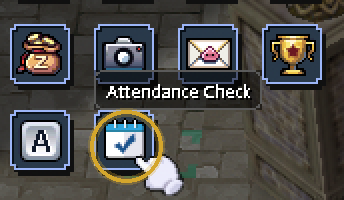
Log in to the game. The calendar opens by itself the first time you log in each day. To open it yourself, click the calendar button among the menu buttons of your Basic Information window.
Click today’s reward in the calendar to claim it.
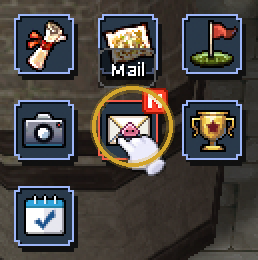
A red N on the mail button tells you the reward has arrived. Click the mail button.
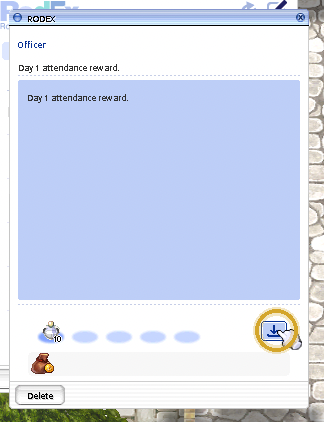
Open the mail called “Day 1 attendance reward” (the number is your day).
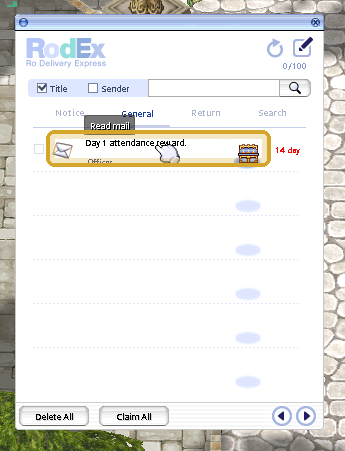
Click the download arrow to move the items into your inventory.
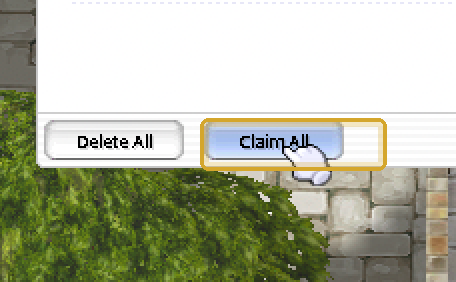
Tip: Claim All takes the items from every mail at once.
Make sure you have room in your inventory and aren’t over your weight limit before taking the items.